
Session prep that writes itself
Open a client's dashboard in Grove and the context for their next session is already pulled up: recent check-ins, the habits they hit or missed, the notes they wrote to themselves, and what has changed since you last met. Grove suggests agenda items based on that activity, and you choose what to keep, edit, or set aside.
Try Grove →Without session prep built in, the work happens Sunday night. Scrolling through emails and DMs from each client, trying to remember where you left off last week, retyping fragments into a notes app or a session-prep doc you maintain by hand. Add 15 clients and the prep becomes the second job. Grove pulls every client's recent activity into one auto-prepped view and surfaces the agenda items worth talking about, so you spend the time on the conversation, not the search.
Open a client and the session is already prepped, top to bottom.
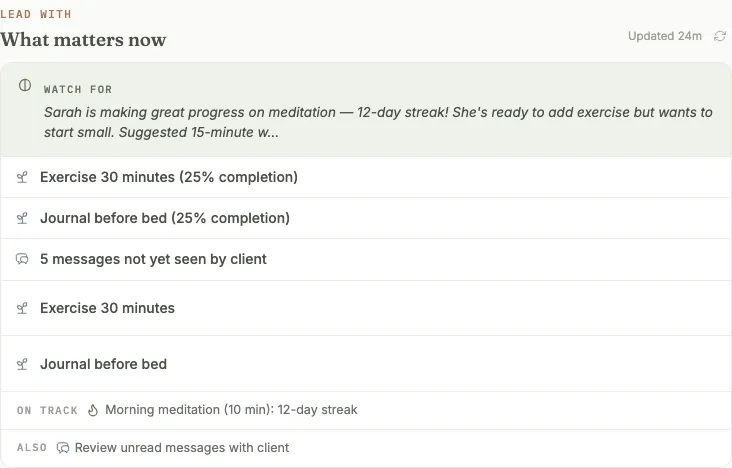
What matters now: the signals worth leading with, pulled from their week.
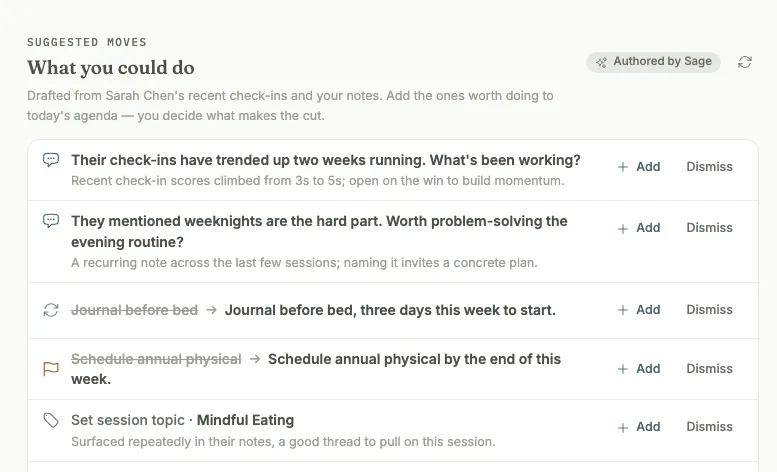
Talking points, drafted by Sage from their check-ins and your notes.
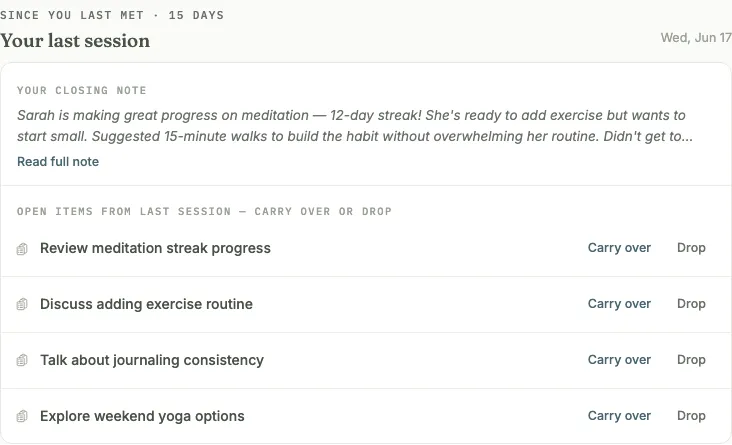
Last session's open items, ready to carry over or drop.
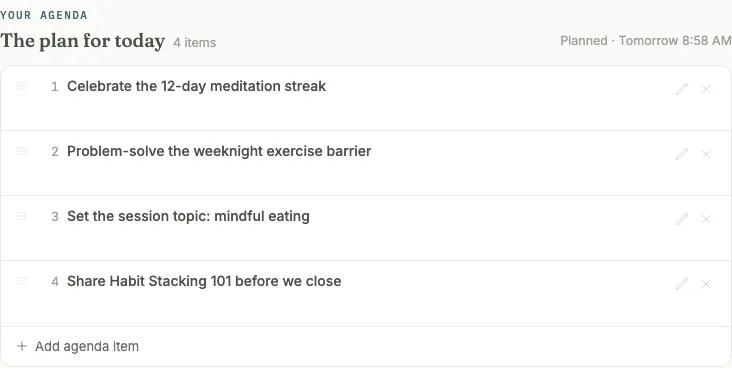
Your plan for today, built from what you carried over and added.
How Grove handles session prep
- Auto-prepped session view: recent check-ins, habits, reflections, and what has changed since the last session.
- Structured agenda recommendations based on the client's recent activity, with items flagged for your attention (tender habits, mood drops, stalled goals) and items flagged for celebration (streaks, completed goals, positive intake themes). You choose what to keep; Grove never enforces an item.
- Private notes for your own reference during the session, never visible to the client.
- Shareable session notes that pre-fill from the agenda items you discussed, ready to email to the client right after the session.
- Undiscussed agenda items roll into a backlog for next time, easy to pull back in or dismiss when they are no longer relevant.
- Attach video and PDF resources to a session topic. Grove remembers what you have already shared with each client across sessions.

Session prep saves the most time for coaches running 10+ clients on weekly or biweekly cadences.
- Show up prepared: session prep with Sage → — the step-by-step walkthrough from your morning Daily Pulse through building an agenda, locking in the plan, and your own private reflection.
- Set up intake forms (and put the answers to work) → — build the form and choose how it gets filled in, so what you learn up front is already on the agenda the first time you open this view.
- Make reflections a measurable practice → — turn on Weekly Reflections so a client's own words arrive in your prep before you ever open the client record.
Common questions
How does Grove decide what to surface in the prep view?
Grove pulls everything from the last session forward (recent check-ins, habits hit or missed, the client's reflection notes, goal milestones, messages they sent you), and flags items for your attention or for celebration based on what is changing. Attention flags include tender habits (three or more missed check-ins), mood drops, unread messages, stalled goals, and any flags you set during intake. Celebration flags include streaks, completed goals, and positive intake themes like clear goals or prior positive experiences. Activity from before the last session stays accessible but does not crowd the briefing.
Can I customize the prep view per client or per program?
The default prep view shows different agenda items for every client every time, because it is based on their recent data: check-ins, habits, reflections, recent messages. You choose what to add to each client's agenda every time, and Grove never enforces an item. You can also set a custom topic per session as the client's weekly focus and share resources for discussion right in the session. Those resources attach to the session along with the related notes, and Grove remembers what you have already shared from session to session.
What about clients I meet weekly vs monthly?
The prep view defaults to "since last session," so a weekly client shows you a week of activity and a monthly client shows you four weeks. The view adapts to the actual cadence you keep with that client.
Where do my session notes live?
Session notes attach to the client timeline alongside their check-ins, habits, and reflections. The next time you open the client, last session's notes are right there in context, not lost in a separate notes app or a session-prep doc. Clients see only the notes you share with them, along with the session topic and any shared resources. Your private notes stay private.
Related features
Sage, your assistant coach
The assistant coach behind this view: a morning Daily Pulse on every client, plus the Talking Points that prep each session.
Learn more →Daily check-ins
Recent check-ins are pulled into the prep view automatically.
Learn more →Client messaging
Unread messages flag for your attention before the session.
Learn more →Session reflection
The bookend coming out. A private moment to set the session down once the notes are saved.
Learn more →
Walk into your next session prepared
Start free on yourself. No clients to set up and no credit card, so you experience what your clients will before you invite anyone in.
Try Grove →