A check-in tells you what a client did. A reflection tells you what they noticed. Grove’s Weekly Reflections send a short set of questions before each session, close enough to the call that the answers are still fresh, and the responses land right in your session prep instead of a separate inbox you have to remember to check. That combination, timed prompts plus prep-integrated answers, is what turns a reflection from a nice-to-have into a measurable habit for both of you.
Reflections are session-driven, not calendar-weekly: Grove sends one 3 days before whichever session comes next on a client’s calendar, so the rhythm follows their actual schedule rather than a fixed day that may not line up with when you’ll actually see them. The name “Weekly Reflections” describes the cadence when sessions run about once a week, which is the common case; the mechanics underneath track sessions, not the calendar. And if you practice against board-certification standards, structured reflection is a tool the field has already vetted; see how this practice supports NBHWC best practices below for how this setup maps to the competencies, and how it lines up with ACLM guidance if you work the lifestyle-medicine side of the field.
The terms you’ll see
A few words carry precise meanings in this flow. Here’s the map:
| Term | What it means |
|---|---|
| Weekly Reflections | The practice-wide switch in Settings that turns the feature on for every active client at once, including a self-coaching record. |
| Default send day | The fallback day Grove uses for a client with no upcoming session to count backward from. Ignored for any client who does have one, since Grove always sends 3 days ahead of their next session instead. |
| Send on a specific day each week | The per-client override, set from a client’s Profile tab, that replaces the session-based 3-day timing with a fixed weekly send for that one client. |
| Customize Questions | The action that opens the reflection form in Grove’s form builder. One question set applies to your whole practice; there’s no client-specific set yet. |
| Submitted | A reflection the client has answered. Its card shows the sent, submitted, and next-due dates and expands to the full set of answers. |
| Pending | A reflection that has gone out and is still waiting on the client’s answers. |
| Past due | A reflection whose deadline passed unanswered. It shows as “Not submitted” in the client’s history once its period ends, doesn’t block anything else in their record, and isn’t resent. |
| Upcoming | A reflection that hasn’t gone out yet. |
| Add to agenda | The action, available on any submitted answer in session prep, that adds “Discuss: {the question}” to your session agenda with the client’s answer attached as your note. |
Before you start
- You’ll need at least one active client, though enabling reflections applies to your whole practice at once, not one client at a time.
- Do this from Settings, under the Client Experience section. Turning the feature on and picking your defaults takes about two minutes.
- Enabling reflections is a practice-wide switch. If you want fewer client-specific decisions, Grove’s default six-question set already covers what most coaches ask; you can always customize it later without losing responses already submitted.
Steps
-
Turn on Weekly Reflections. In Settings, scroll to Client Experience and find the Weekly Reflections card. Toggle Enable Weekly Reflections on. Grove’s default form activates immediately, so reflections start going out on the schedule below without any further setup.
Heads up: this is a single practice-wide switch, not a per-client opt-in. Once it’s on, every active client (including a self-coaching record, if you have one) starts receiving reflections on the schedule you set. See does self-coaching mode include reflections?
-
Set your fallback day. With reflections enabled, a Default send day control appears below the toggle. This is the day Grove uses for any client who doesn’t have an upcoming session to count backward from, so nobody goes quiet just because a session hasn’t been booked yet.
Gotcha: the fallback day only applies when there’s no session to anchor to. For a client with a session on the calendar, Grove always sends 3 days ahead of it, regardless of what the fallback day is set to. See when are reflections sent?
-
Keep the default six questions, or customize your own. Once reflections are on, click Customize Questions to open the reflection form in Grove’s form builder. Grove ships with six questions by default (what felt easier, where you showed consistency, any mindset shifts, where things felt harder, one thing to try differently, and what you need help with), the same set from the weekly reflection that actually gets answered. Edit, reorder, or replace any of them the same way you’d edit any other Grove form.
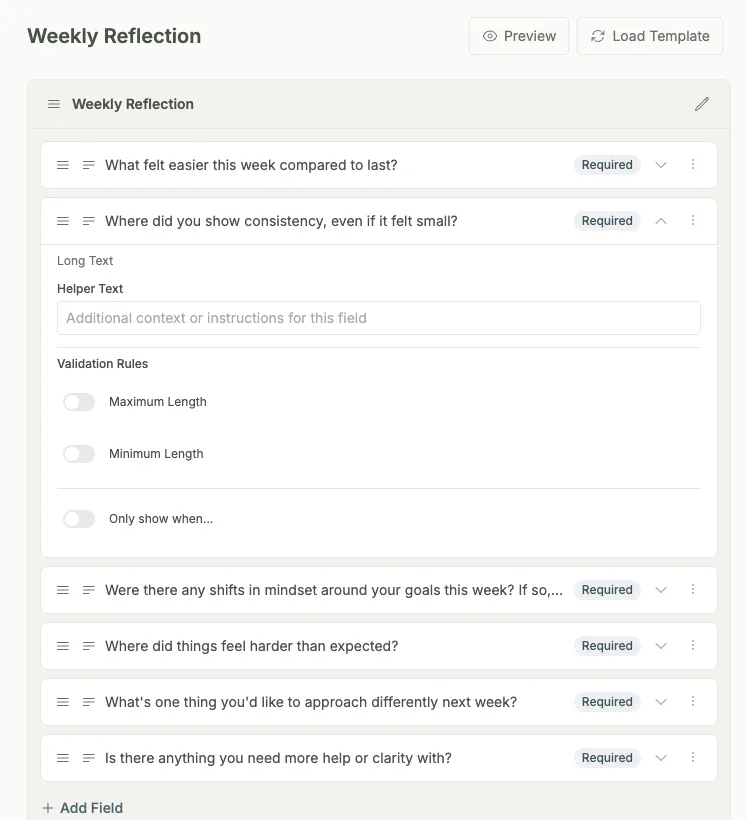
Heads up: there’s one question set for your whole practice today; a client-specific set isn’t available yet. See can I change the reflection questions?
-
Override the schedule for one client, if their situation calls for it. Open that client’s Profile tab and find the Weekly Reflections section. Turn on Send on a specific day each week and pick a day; this replaces the session-based 3-day timing with a fixed weekly send for that client only, useful for someone whose sessions are irregular or far apart.
-
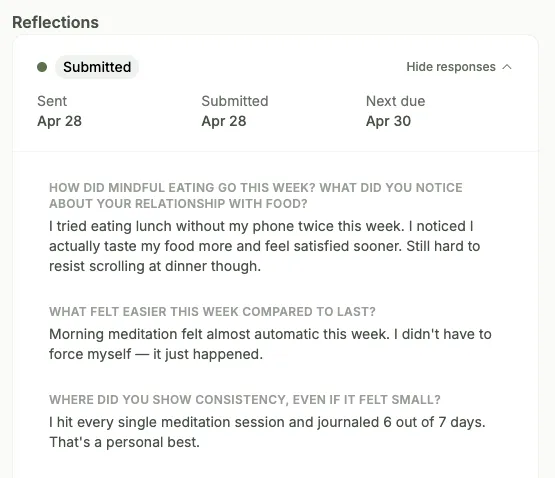
Read what comes back in session prep. Open a client’s session prep and scroll to the Weekly Reflection section. A status badge shows where things stand: Submitted with the sent, submitted, and next-due dates, Pending while you wait, Past due if the deadline passed, or Upcoming before one has gone out yet. Click a submitted card to expand the full set of questions and answers.
-
Bring a specific answer straight onto your agenda. Hover a response line in an expanded reflection and click Add to agenda. Grove adds “Discuss: {the question}” to your session agenda with the client’s answer attached as your note, so you don’t have to retype anything they already wrote.
Tip: do this while you’re still reading, not after. It’s the fastest way to make sure a specific line from a reflection actually makes it into the conversation instead of getting lost once you move on to the next section of prep.
-
Expect the occasional Past due badge, and don’t chase it. A reflection goes Past due the day after the full calendar day following when it was sent (sent Monday, past due starting Wednesday). It doesn’t block prep, scheduling, or anything else about that client’s record, and the next period’s reflection still goes out on its own schedule.
Gotcha: a Past due reflection doesn’t roll over or get resent. It shows as “Not submitted” in the client’s reflection history once its period ends. See what happens if a client doesn’t submit their reflection?
How this practice supports NBHWC best practices
Structured reflection is not a Grove invention; it runs all through the NBHWC Content Outline (2026-2030), from the facilitation tools list to how a follow-up session is supposed to open. The practice in this guide is built so that running it means practicing those standards between every session, not just inside one.
-
Reflective practice is a named facilitation tool (3.1.8, 3.1.9). The outline’s “Skills, Tools, and Strategies” domain lists reflective and self-awareness practices, journaling among them, as facilitation tools, and names digital health platforms and technology right beside them. Weekly Reflections is that pairing made concrete: a short written reflective practice, delivered and collected by the platform on a schedule you set once.
-
Fresh answers set up the follow-up session’s opening (1.6.1, 1.6.2). The outline’s follow-up-session competencies start with reconnecting: inviting the client to reflect on how they are showing up, and to share success and learning since the previous session. Because Grove sends the reflection 3 days ahead of whichever session comes next, those answers are current when the call starts, and reading them in prep (step 5) means you open with the client’s own words instead of asking them to reconstruct their week live.
-
The default questions target awareness, shifts, and insight (3.4). The outline devotes a full section to client awareness, perspective shifts, and insights: eliciting awareness of self-talk (3.4.1), exploring the patterns behind behavior (3.4.3), and inviting and amplifying client insights (3.4.5). The default six are written for exactly that. “Were there any shifts in mindset” catches a reframe as it happens, “where did things feel harder” surfaces the pattern underneath the friction, and Add to agenda (step 6) is amplifying an insight in the most literal sense: a client’s own sentence, promoted into session material.
-
Naming progress builds self-efficacy (3.5.5). The outline asks coaches to support clients to build confidence “through reflection, self-assessment, and naming of learnings and progress made.” That is questions 1 and 2, what felt easier and where consistency showed up, doing self-efficacy work in writing before the session even starts.
-
Accountability stays the client’s, without judgment (3.3.4, 3.9.7). The outline asks coaches to honor, without judgment, a client’s preferences for self-monitoring and accountability, and to establish “client’s own methods of accountability and tracking progress, moving toward self-management.” The per-client schedule override (step 4) bends the rhythm to the person, and a Past due badge that blocks nothing and triggers no chase (step 7) keeps the reflection an accountability tool the client owns, not a compliance metric you enforce.
None of this makes the form do the coaching. It makes the version of reflection the board already certifies, timed to the session, owned by the client, and read before you walk in, the default in your practice rather than the exception.
How this practice lines up with ACLM guidance
The mapping holds outside coaching’s own board too. The American College of Lifestyle Medicine, the professional body for lifestyle medicine clinicians, publishes its own guidance on health coaching and behavior change, and the same reflection practice shows up there from a different angle.
-
Self-monitoring keeps clients engaged between visits. ACLM’s health-coaching guidance treats client self-monitoring, journals and apps among the tools, as a core way to track progress and stay engaged between conversations. A weekly reflection is that instrument in its lightest form: recurring, written, and short enough to actually get answered.
-
Reflections are a named motivational interviewing skill. The Lifestyle Medicine Core Competencies (2022 update) ground behavior-change work in motivational interviewing, where open inquiry and reflections carry the conversation. Questions 1 through 4 (easier, consistency, mindset, friction) put the client’s own words on the table so you can reflect them back in session instead of fishing for them live.
-
Goal work is a loop: act, reflect, reassess. ACLM frames goal work as codesigned and then revisited: reflect on progress, name the insights, reassess what is not working. Question 5, one thing to approach differently next week, is the reassess step, and it arrives in your prep with a starting line already drawn.
-
The client holds the agenda. Lifestyle medicine’s coach approach leans on autonomy and collaborative partnership over prescription. Question 6, anything you need more help or clarity with, hands the client the agenda for the session you are about to run.
One place Grove deliberately diverges: the reflection captures direction, not a formally specified SMART goal. That specificity lives where ACLM would put it too, in the goal itself rather than the check-in; see the habits and goals lifecycle guide for how Grove makes the specific, measurable part structural.
What’s next
Reflections are one more source feeding the briefing you already read before every session. See Show up prepared: session prep with Sage for the full ritual, from your morning Daily Pulse through locking in a session plan, and how Sage weaves reflections in alongside check-ins, habits, and notes. If you haven’t tried the practice on yourself yet, get set up and coach yourself first covers turning on self-coaching, where the exact same Weekly Reflections toggle applies to your own record.