Goals and habits are the substance behind every check-in. A client with nothing set up sees a blank form each day; a client with a goal and a habit or two attached sees a reason to show up. But goal setting for coaches is more than filling in forms: the craft is in whose words the goal is written, how an outcome becomes repeatable behavior, and what happens to the plan when life changes it.
Grove’s habit tracking is built around that craft. Goals hold the destination, in your client’s own words and with their own why attached; habits are the behaviors that get them there, each on a rhythm your client can actually keep; and every item moves through a lifecycle that mirrors how behavior change really goes. This guide walks that lifecycle, and because it lines up with the goal-setting competencies in the NBHWC Content Outline, there’s a section at the end mapping the two.
If you haven’t invited your first client yet, start with Invite and onboard your first client; everything below applies whether you’re setting up a brand-new client or adjusting an existing one’s plan.
The terms you’ll see
Grove borrows a garden’s vocabulary for this lifecycle. Here’s the map:
| Term | What it means |
|---|---|
| Goal | The outcome your client wants, written in their words. A Numeric goal tracks a target number; a Milestone goal marks a one-time achievement. |
| Habit | A repeatable behavior on a rhythm, from every day to a few times a month, linked to the goal it serves. |
| Action | A one-time task with an optional “Complete by” date (“Schedule your annual physical”), for steps that happen once rather than repeat. Actions can link to a goal too. |
| Active | Visible in your client’s check-ins and counting toward streaks and progress. |
| Future | Planned but invisible to your client until you activate it. |
| Tender, Growing, Thriving | A habit’s growth stage: how consistently your client has been keeping it, from newly planted to well established. |
| Rooted | A habit your client has fully made their own. It leaves daily check-ins and lives on in Rooted Habits. |
| Completed | A goal your client reached. It keeps its history and can be reactivated. |
| Archived | Finished running and hidden from your client, with full history kept. Restorable any time. |
Before you start
- Open the client’s profile and go to the Goals or Habits tab. Both live on the same client-detail page.
- Best case, you’ve just finished a session where the goal came up in your client’s own words. The forms below work best as transcription of a conversation, not invention on their behalf.
- Decide up front whether your client should see each item immediately (Active) or you’re preparing it for a future conversation (Future). You can change your mind later.
- Budget a couple of minutes per item. Nothing you create is visible to the client until you say so.
Steps
-
Start with the goal, not the habit. On the Goals tab, click Create Goal. The form opens asking “What does your client want to achieve?” with the instruction that matters most: “Make it specific, meaningful, and in their words.” Write the outcome the way your client said it, then choose Numeric (a target number, like “lose 10 lbs”) or Milestone (a one-time outcome, like “run a 5K”). A numeric goal takes a target value, an optional unit, and a direction (Higher is better for steps or savings, Lower is better for cholesterol); an optional Target date adds a horizon when the outcome has a real deadline.
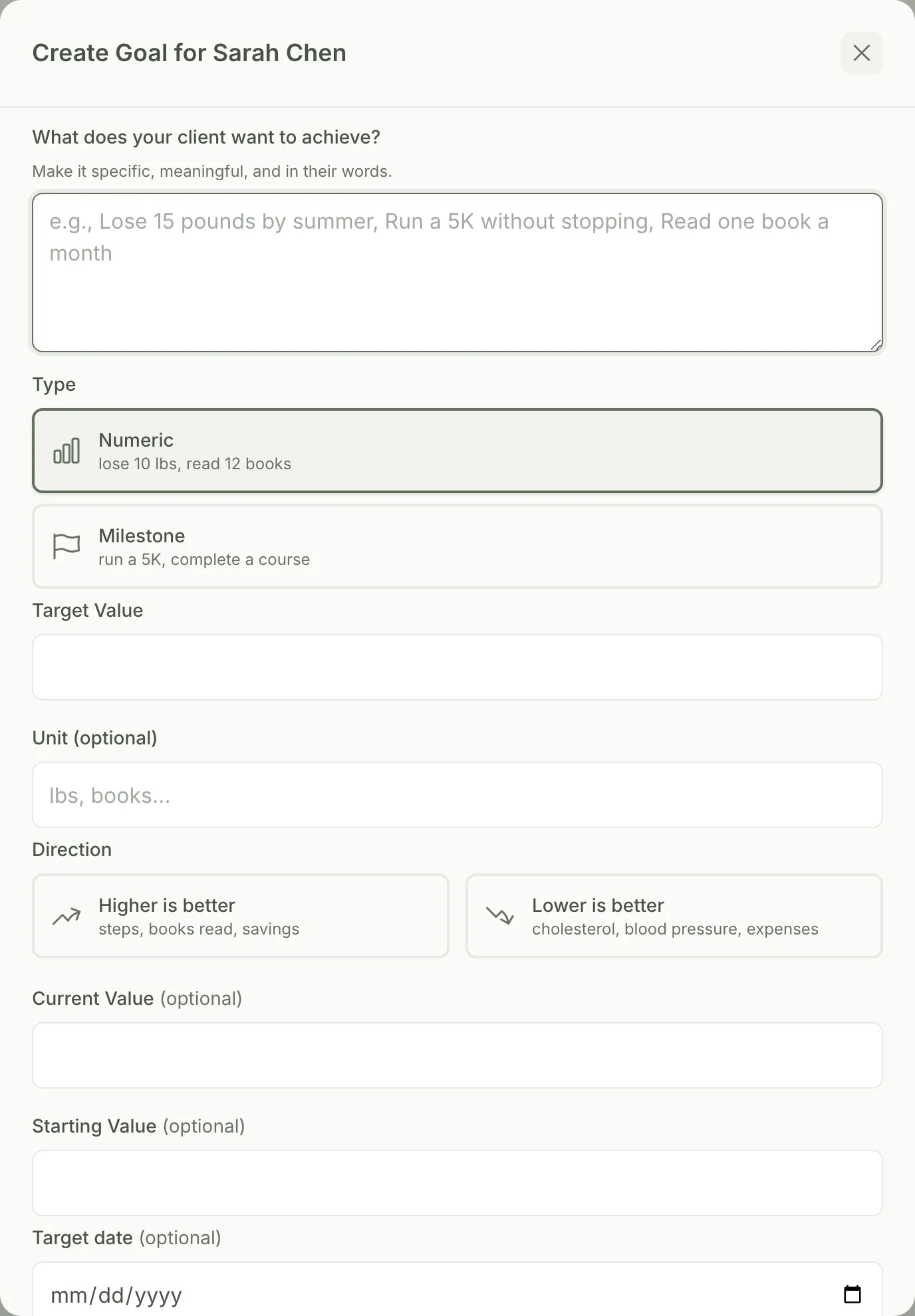
Tip: A goal that’s tracking a number can be linked to a recurring measurement so its progress updates automatically instead of you updating it by hand. The Create Goal form offers to set this up right after you save.
-
Capture their why while it’s fresh. The optional Their why section asks two questions worth answering in your client’s voice: “Why does this matter long-term?” and “Why is this important right now?” Fill these in from the session where the goal surfaced. Weeks later, when momentum dips, a client’s own reasons reflected back land very differently than yours. Here too, checking Plan for later keeps the goal invisible until you activate it.
-
Create the habits that serve the goal. On the Habits tab, click Create Habit. Describe one clear, repeatable behavior (Grove’s own placeholder examples: “10-minute morning meditation,” “Walk after dinner”), pick the rhythm your client can actually keep (Every day, Times a week, Certain days, Every few days, or Times a month), and use Link to goal to attach it to the outcome it serves. Check Plan for later if you’re not ready for your client to see it yet; leave it unchecked and the habit is Active the moment you save it.
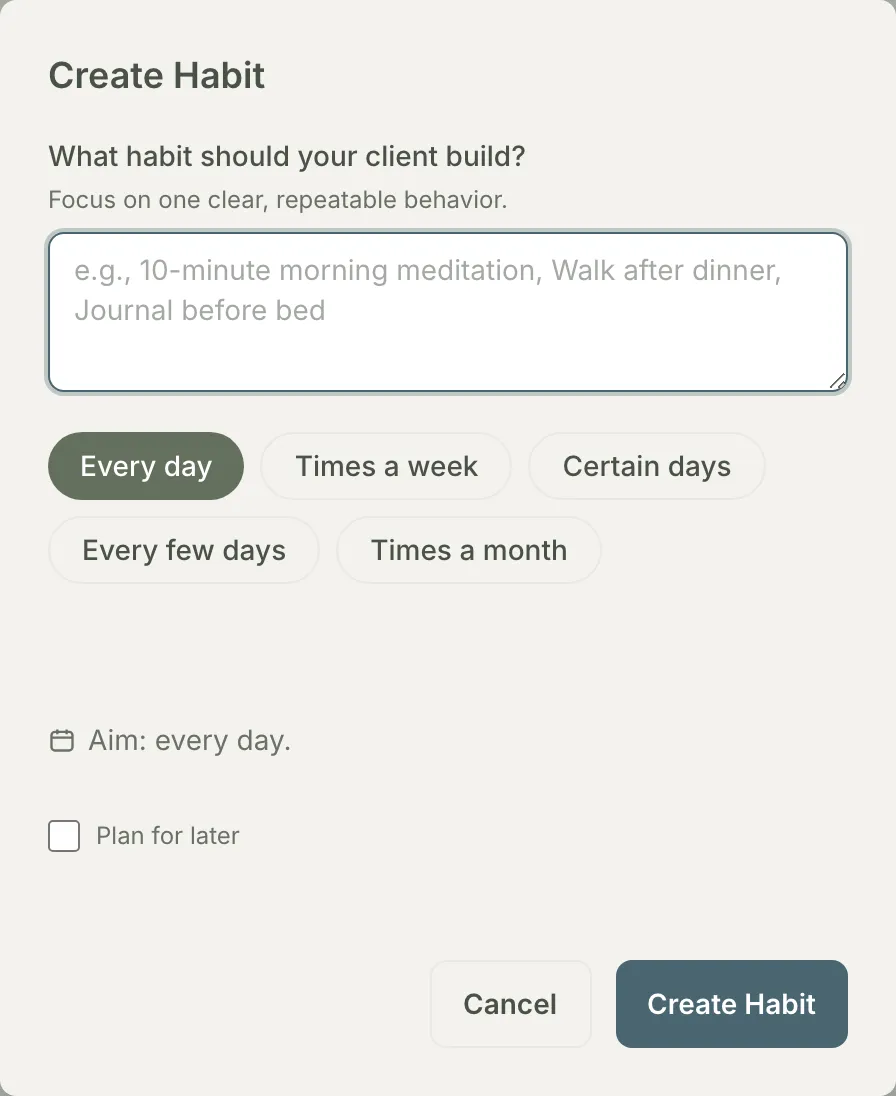
Gotcha: a Future item is never visible to the client, whether it came from the habit checkbox or the goal form’s own “Plan for later” toggle. See what does Future mean?
-
Introduce Future items at your client’s pace. There’s no automatic activation by date; you choose the moment. For a goal, click the Activate button directly on the goal card. For a habit, edit it and uncheck Plan for later, which flips its status back to Active. This is how you stage a whole plan between sessions and still introduce it one piece at a time, in conversation, instead of dropping five new behaviors on someone’s Tuesday. The moment you activate an item, your client sees it in their check-ins and it starts counting toward streaks and progress.

Heads up: Everything about a Future item stays invisible until you activate it, including from streaks, completion tracking, and your own briefing. It’s a pure planning tool until then, not a soft launch.
-
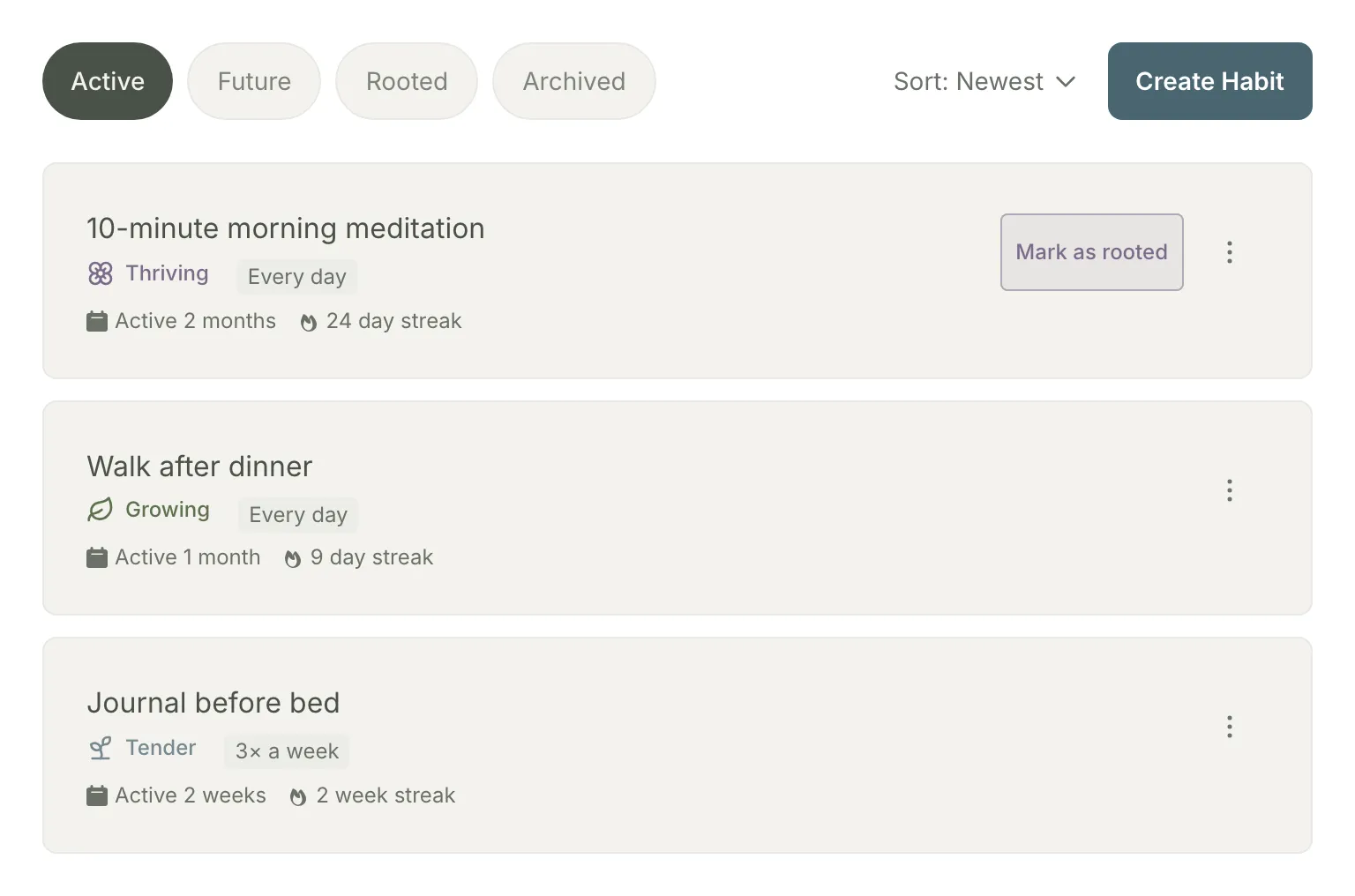
Read progress as coaching material. An active goal’s percent-complete and last-updated date show up on your Session Prep briefing under Active Goals, so you don’t have to open the client’s profile to see whether it’s moving. Each habit’s row on the Habits tab shows its current streak and a growth stage (Tender, Growing, Thriving) tracking how consistently your client has kept it up. Treat the stages as conversation prompts, not grades: a habit that’s still Tender after a month isn’t a failing client, it’s your next session topic, and often a sign the habit is sized wrong rather than the person.
-
Mark a thriving habit as Rooted. Once a habit has been active for at least three weeks and is holding Thriving, a Mark as rooted action appears on its row (visible on the meditation habit in the screenshot above). Click it and confirm in the Mark as Rooted dialog: the habit moves out of daily check-ins entirely into Rooted Habits, Grove’s record that your client made the behavior their own. This is the point of the whole exercise, so treat it that way in session: name it, celebrate it, and decide together what the freed-up space is for.
Tip: Rooting isn’t offered until a habit qualifies. If you don’t see the action yet, the habit either hasn’t been active three weeks or isn’t currently Thriving.
-
Archive what no longer serves the plan. From either tab, archiving a habit or goal removes it from your client’s check-ins and program view (for a goal, a confirmation reminds you your client will no longer see it) while keeping its full history. Plans should change as clients change; archiving keeps the plan honest without erasing the work. Nothing about it is permanent.
Gotcha: Archived and Future look similar (both are invisible to the client) but mean opposite things. Archived means you’re done with something that already ran; Future means you haven’t started it yet and the client has never seen it. See the difference between archiving and Future
-
Restore when the time is right again. Clients circle back, and the plan should let them. For a habit, restoring offers a choice: bring it back Active (in check-ins immediately) or Future (planned but held back again). For a goal, reactivating (available on completed or archived goals) brings it straight back to Active. Either way your client picks up the same item with its history intact, which reads as continuity rather than starting over from zero.
-
Rework wording without losing momentum. Editing a habit or goal’s description never resets its streak or completion history; both are tied to the item itself, not how it reads today. You can sharpen a vague habit into a specific one mid-streak, at no cost. One thing to know: past check-ins display the current wording, so if the original phrasing matters to you, note it in your session notes before you edit.
Gotcha: An archived habit is locked. To reword one, restore it first, make your edit, then re-archive if it should stay archived. See editing and streaks
How this lifecycle supports NBHWC best practices
Goal setting is not just a product feature; it’s a named competency area in the NBHWC Content Outline (2026-2030), section 3.9 of “Skills, Tools, and Strategies”: defining goals and implementing action. The lifecycle in this guide is built so that working it means practicing those standards.
-
The client sets the destination (3.9.1, 3.9.2.1). The outline asks coaches to help clients establish their own goals, aligned with their pace, interests, and values. In Grove, a new client picks their first goal themselves during sign-up, the goal form says “in their words,” and Future status matches the plan’s pace to the person.
-
Goals are specific, realistic, and time-bound (3.9.2.2). The outline points to SMART-style goals. Grove makes the specific part structural: a Numeric goal carries a target value, unit, and direction; a Milestone names a concrete outcome; a Target date adds the time bound when one exists.
-
Outcome goals become behavioral goals (3.9.3). Translating “lose 15 pounds” into “walk after dinner” is the outline’s competency 3.9.3 and Grove’s Link to goal field. The habit rhythms let you dose the behavior at a level your client can win at, then raise it.
-
Tracking moves toward self-management (3.9.7). The outline asks for client-owned accountability and progress tracking, “moving toward self-management.” Streaks and growth stages keep progress visible along the way, and Rooted is the endpoint made explicit: the moment you stop tracking a behavior because your client owns it now.
-
Setbacks are part of change, not the end of it (2.2). The outline’s theory domain includes the Transtheoretical Model, where returning to an earlier stage is an expected part of change. Archive and restore are that model in practice: a paused habit keeps its history, coming back reads as continuity, and rewording never costs the streak. The plan bends without punishing the person.
None of this replaces your judgment about which goal matters or when a client is ready for the next habit. It makes the well-practiced version of goal setting the path of least resistance.
What’s next
Every Active habit and goal you set up here is what turns your client’s next check-in from a blank form into something with substance to react to. See Run the weekly rhythm (check-ins as dialogue) for keeping that response loop going, and Show up prepared: session prep with Sage for how these goals and habits feed the briefing you walk into each session with.